Table of Contents
Valid Value Selection Screen
Overview
The Valid Value Selection Screen allows custom Produmex Scan screens to replace free-text inputs with predefined, easy-to-select values. The selection screen can be applied to an existing input field or added as a new field, and is fully supported on both Android and Windows Mobile devices.
How the Valid Value Selection Screen Works
The valid value selection screen uses Valid Values to populate the selectable list.
The Default Value field specifies which key should be preselected when the screen loads.
Optional user queries can fully override the valid values or default value:
- BXMobileWH9_<ScreenName>_<ControlName>_<InternalDataLoad> - Returns the list of valid values.
- BXMobileWH9_<ScreenName>_<ControlName>_<DefaultValue> - Returns the default value key.
Note: If these queries are defined, their results take priority over the standard field configuration.
How to Create a Customized Valid Value Selection Screen
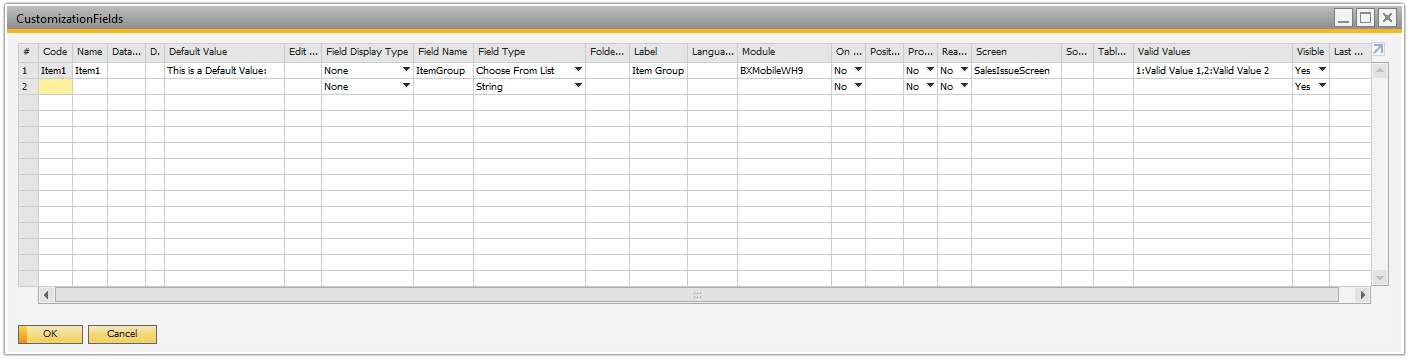
1. Open Customization Fields
- In SAP Business One, navigate to: Produmex Scan → Customization → Customization Fields
2. Set Field Type to Choose from List
In the Field Type column, select Choose from List. This tells Produmex Scan to use a Choose from List instead of a text field.
3. Define Valid Values
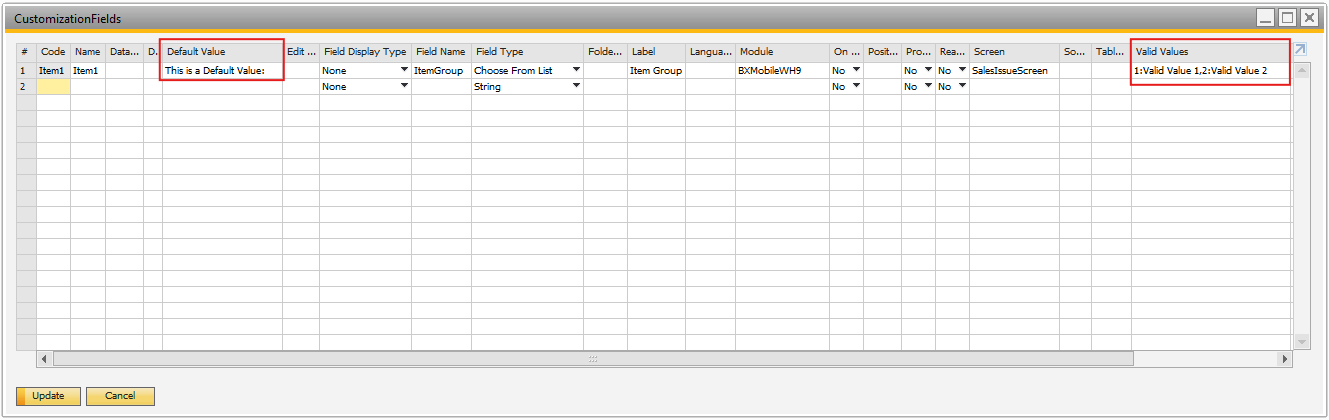
The user can define valid values in either of the following ways:
- Option A - Enter key-value pairs directly
- Use the Valid Values field and provide pairs in the format: KEY1:Value 1,KEY2:Value 2,KEY3:Value 3
- Example: 1:Valid Value 1,2:Valid Value 2
- Option B - Use a user query
- Enter the name of an SAP user query
- If the query BXMobileWH9_<ScreenName>_<ControlName>_load_values is defined, it will override the field, the load_values query is used to retrieve the valid values. The query must return a key–value pair, and the returned value will be used as the default.
Filtering Sales Orders by Item Group
This example shows how the Valid Value Selection screen can be used to filter Sales Orders based on Item Groups.
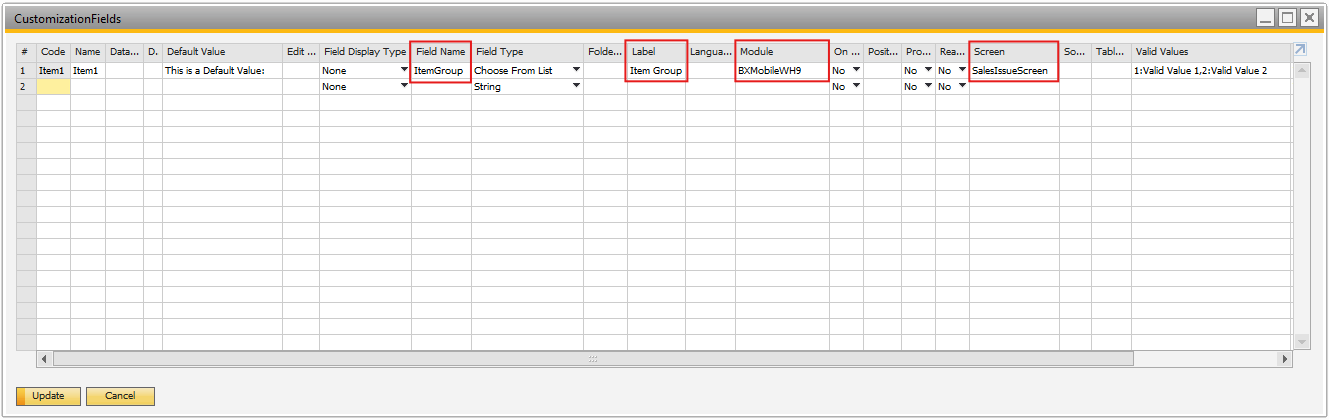
Based on the example image let's create a custom query that contains the following:
- Field Name: ItemGroup
- Label: Item Group
- Module: BXMobileWH9
- Screen: SalesIssueScreen

Step 1: Displaying a List of Valid Values
Select a list of valid values that will be displayed:
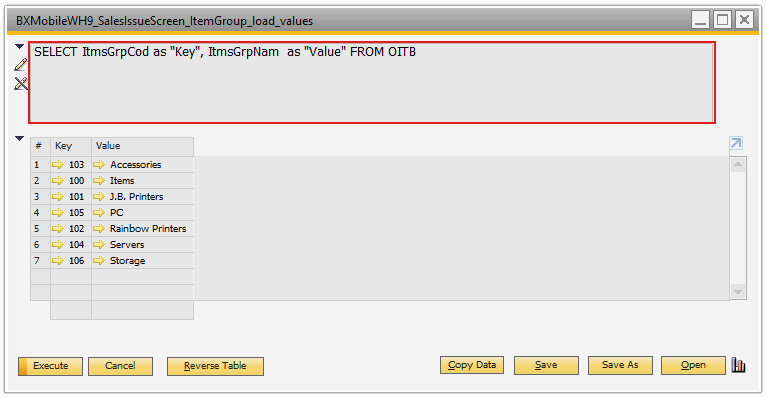 Open the Query Manager and create a query:
BXMobileWH9_SalesIssueScreen_ItemGroup_load_values
Insert the content:
select
    ItmsGrpCod as "Key",
    ItmsGrpNam as "Value"
from OITB
Step 2: Selecting and saving a Value from the List
When the user selects an Item Group from the Valid Value Selection Screen:
- The selected Item Group Code is stored by the system
- This stored value is later used to filter Sales Orders
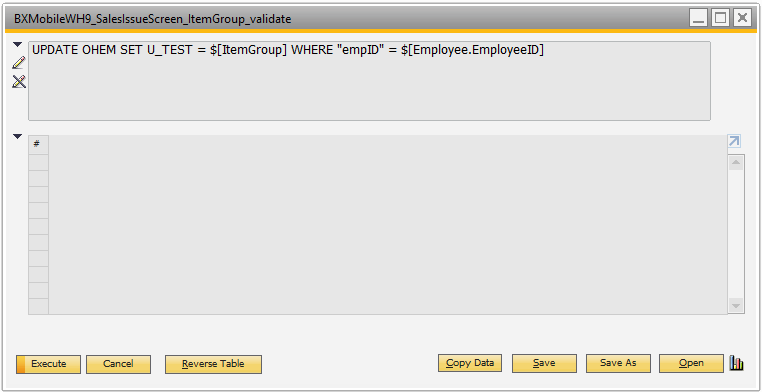
Open the Query Manager and create a query:
BXMobileWH9_SalesIssueScreen_ItemGroup_validate
Insert the content:
UPDATE OHEM
SET U_TEST = $[ItemGroup]
WHERE "empID" = $[Employee.EmployeeID]
Step 3: Reloading the Sales Order Screen
Pressing Reload will show:
- Open Sales Orders
- Only those Sales Orders that contain items from the selected Item Group
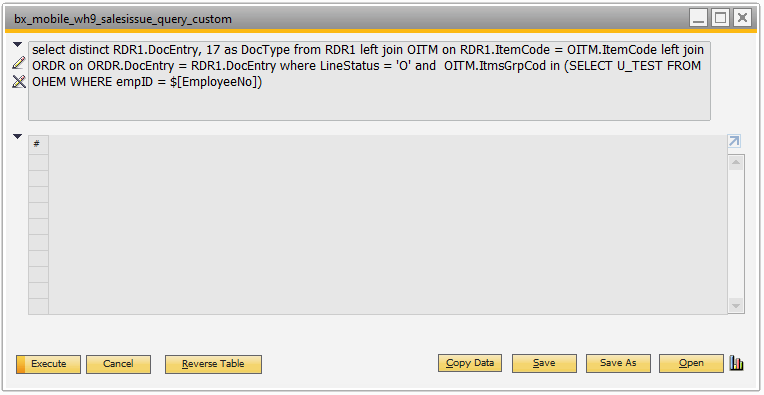
Open the Query Manager and create a query:
bx_mobile_wh9_salesissue_query_custom
Insert the content:
select distinct
    RDR1.DocEntry,
    17 as DocType
from RDR1
left join OITM on RDR1.ItemCode = OITM.ItemCode
left join ORDR on ORDR.DocEntry = RDR1.DocEntry
where
    LineStatus = 'O'
    and OITM.ItmsGrpCod in (
        select U_TEST
        from OHEM
        where empID = $[EmployeeNo]
    )
Step 4: Save and see the result
The Valid Value Selection Screen provides a simple and reliable way to:
- Display a list of valid values from the database
- Let users select a value instead of typing manually
- Save the selected value
- Automatically filter data on other screens


4. Set a Default Value
The user can define a default value in one of the following ways:
- Option A – Manual Default Value
- In the Default Value field, you can manually enter the text that should be displayed.
- Example: “This is a Default Value”
- Option B – Using a User Query
- A default value can be provided using a user query. The query can be the following for example: BXMobileWH9_<SalesIssueScreen>_<ItemGroup>_load_default_value