Produmex Scan 2025.12
Produmex Download page
Download version 2025.12
Tested SAP Business One versions
- SAP B1 10.0 SP2511 64-bit MSSQL 2019
- SAP B1 10.0 SP2511 64-bit HANA 2.00.059.09
Note: Older and newer SAP Business One versions will usually also work, but have not been specifically tested in this version.
If you use Produmex Manufacturing and you upgrade to Produmex Scan 2021.10 or higher, make sure that you upgrade to Produmex Manufacturing 2021.10 as well. Without an upgrade, Produmex Manufacturing will not work because of version incompatibility.
Produmex Service Broker must be upgraded for this version
With SAP B1 version 10.0 FP 2405 when trying to access database table via Data Interface (DI) API, the user might get an error //“Cannot access table. Please check it is listed in the allowed list. For more information, see SAP Note 3399053.” //
To solve the issue, go to Administration → System Initialization → General Settings → Services tab → DI API Configuration group, click the '…' button next to Enable Query Validation and append the database table to the allowlist.
Release Notes
Previous Release: 2025.09
- The Valid Value Selection Screen allows custom Produmex Scan screens to replace free-text inputs with predefined, easy-to-select values. The selection screen can be applied to an existing input field or added as a new field, and is fully supported on both Android and Windows Mobile devices.
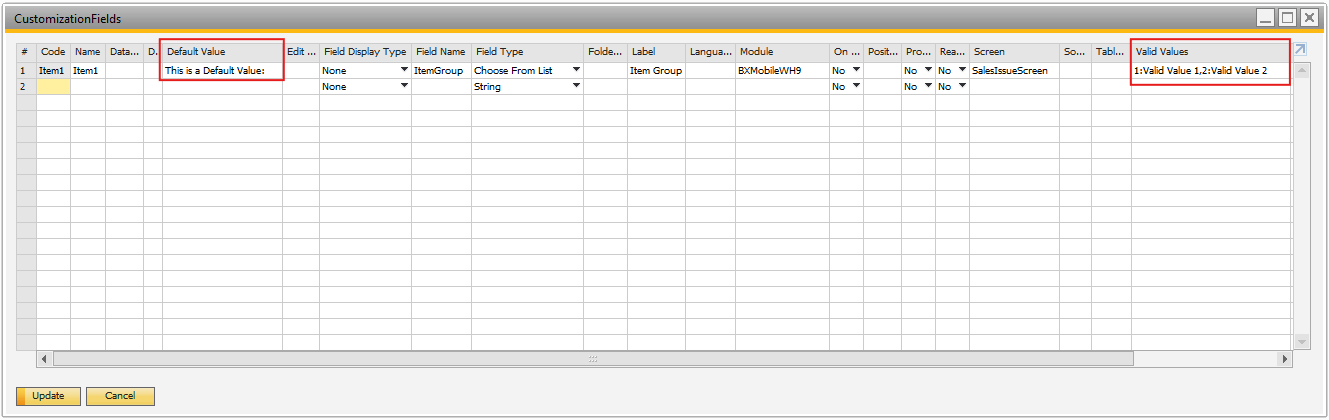
- The valid value selection screen uses Valid Values to populate the selectable list. The Default Value field specifies which key should be preselected when the screen loads.
The user can define a default value in one of the following ways:
Option A – Manual Default Value
- In the Default Value field, you can manually enter the text that should be displayed.
- Example: “This is a Default Value”
Option B – Using a User Query
- A default value can be provided using a user query.
- The query can be the following for example: BXMobileWH9_<SalesIssueScreen>_<ItemGroup>_load_default_value

- The Image Capture allows Produmex Scan to attach photos directly to incoming logistics documents such as Goods Receipt PO and Sales Return.
- When enabled, users can take one or more pictures directly from the scanning flow. Images are validated, saved to SAP’s attachment path, and linked to the document line.
Supported document flows:
- GRPO
- Free GRPO
- Sales Returns (SDN and SRR)
The Image Capture process has three major steps:
- When a picture is taken, it is stored in the device’s memory.
- When the entry is created, the image is saved to the database.
- After the document is posted, the image is saved as a JPG file in the attachments folder and then it will be removed from the database.
Once the document is posted, the physical file is saved under** SAP General Settings → Path for Attachments.** The file name is generated using the defined template, and Produmex Scan stores the final file path in its internal tables.
Useful Links & Information:
- Customization examples - Scan Scripting:
Useful articles about PMX Scan
- For upcoming new features, keep open eyes on our Produmex Roadmap site:
PMX Roadmap
Bug fixes
| Ticket | Description |
|---|---|
| 277281 | Cannot open any form in SAP Business One client after Produmex Scan add-on is started2025.12.00 |
| 275688 | BN Transfer connected false with Transfer Request2025.12.01 |
| 277311 | ReScan Item Code setting does not work with Serial Number managed items2025.12.01 |
| 285039 | Produmex Scan – Error when Cancelling Mobile Transaction2025.12.01 |
| 285966 | User Login to Produmex Scan2025.12.01 |
| N/A | Custom Choose FRom List doesn't work if the field name contains character: _2025.12.01 |