Produmex WMS 2025.12
Produmex download page
Download version 2025.12
Tested SAP Business One versions
- SAP B1 10.0 SP 2511 64-bit MSSQL 2019
- SAP B1 10.0 SP 2511 64-bit HANA 2.00.059.09
Note: Older and newer SAP Business One versions usually also work, but have not been specifically tested in this version.
Make sure that you do not use SBO10 PL3 (FP2008) or PL4 (FP2011) including any of their hotfixes with Produmex WMS. If you are about to upgrade SAP Business One to a PL higher than the one we have tested Produmex WMS on, make sure that you always test your Produmex WMS processes in a test SAP environment before performing the SAP PL upgrade on the live environment. For more information click here.
With SAP B1 version 10.0 SP 2311 when trying to access database table via User Interface (UI) API, the user might get an error //“Cannot access table. Please check it is listed in the allowed list. For more information, see SAP Note 3375193.” //
To solve the issue, go to Administration → System Initialization → General Settings → Services tab → UI API Configuration group, click the '…' button after 'Enable Query Validation' and append the table to the list. Alternatively, turn off 'Enable Query Validation'.
With SAP B1 version 10.0 FP 2405 when trying to access database table via Data Interface (DI) API, the user might get an error //“Cannot access table. Please check it is listed in the allowed list. For more information, see SAP Note 3399053.” //
To solve the issue, go to Administration → System Initialization → General Settings → Services tab → DI API Configuration group, click the '…' button next to Enable Query Validation and append the database table to the allowlist.
DB version: 790
DB Branch version: 0
Required Add-On Loader version: 22
Release Notes
Previous Release: 2025.09
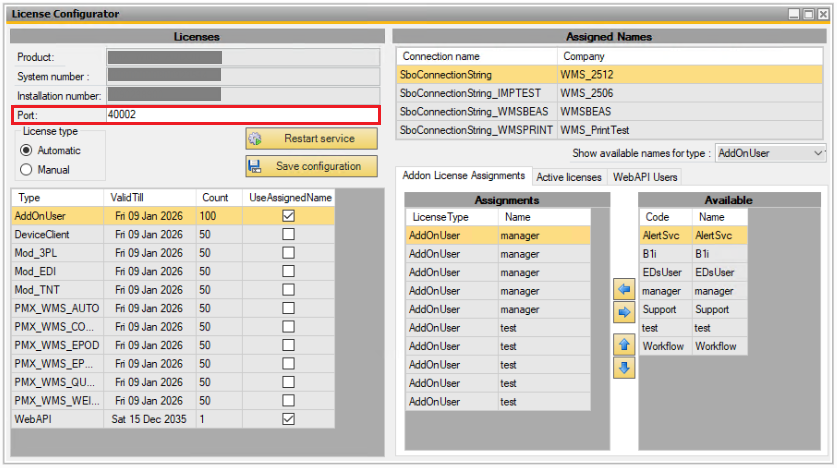
Starting from SAP B1 version SP2511, the License Manager port number has changed from the previous default value of 40000 to 40002.
Users should specify the port number in the Produmex WMS License Configurator tool. This ensures that the Produmex License Server uses the correct port configured during the SAP installation or upgrade process.
Useful Links & Information:
- Visit our documentations site for Beas & WMS integrations:
Beas - WMS Integration
- Customization examples - WMS Scripting:
Useful articles about WMS Scripting & Customization
Bug fixes:
| Ticket | Description |
|---|---|
| 275550 | Quantity tolerance % not considered correctly while doing receipt from Production2025.12.00 |
| 275760 | Scanning barcode does not find item when using flow “Receive from WHS” without an open ITR2025.12.00 |
| 275932 | Incorrect quantity on proposal when batch is allocated in stock transfer request2025.12.00 |
| 211514 | Receive items from a non pmx managed warehouse not always functioning in scenario2025.12.01 |
| 218646 | Receive items on warehouse transfert not always functionning2025.12.01 |
| 264572 | Container are split by supplier when doing the reciving on the scanner2025.12.01 |
| 271314 | Q letter on scanners displaying as O2025.12.01 |
| 274488 | Timeout error on pick list2025.12.01 |
| 274313 | Contianer show multiple times on handheld when multiple vendors on container and can not post after receiving.2025.12.01 |
| 276451 | Ad hoc picking does not recognize the qty in the GS1 barcode2025.12.01 |
| 276936 | Error when creating a Sales Delivery using Movable Location with Stock & Non-stock items2025.12.01 |
| 277076 | Production Order Cannot Be Closed Due to Lined-Up Components – “No Possible Location to Be Lined Up” Error2025.12.01 |
| 278425 | Direct Cycle Count drops error when you want to reduce quantity2025.12.01 |
| 278032 | Error while working with Mobile Packing2025.12.01 |
| N/A | Conversion failed when converting the nvarchar value 'PMX_PLHE' to data type int. line 2246 in dbo.PMX_SP_TransactionNotificationChecks2025.12.01 |
| 194789 | Route details view customization - Columns on the screen are disordered2025.12.02 |
| 204721 | Traceability Report show twice the quantity for a warehouse move with a Master SSCC2025.12.02 |
| 207798 | Need to enter serialnumbers on inventory move2025.12.02 |
| 212323 | UOM not showing properly on transfer request when set to manual2025.12.02 |
| 213665 | Undo Picking doesn't work based on inventory transfer2025.12.02 |
| 215142 | Import tool does not update record unless Standard Fields are changed2025.12.02 |
| 216993 | FMS - Options Inconsistency2025.12.02 |
| 265441 | UoM for sales order picklists and Inventory transfer picklist different2025.12.02 |
| 271261 | Sales Order Get Free Stock button not working2025.12.02 |
| 273690 | Error, wave picking for mixed picklist (from order and trasfer)2025.12.02 |
| 276183 | Incorrect query traceability report2025.12.02 |
| 280506 | Shipping flow error: BO with error code '-5002' and description '1470000145 Packed item is not part of the delivery (UoM 0, items per unit 0,000000)'2025.12.02 |
| 280962 | Duplicated SSCC on GRPO and Beas Goods Receipt transactions that occured at the same time2025.12.02 |
| 281502 | Mobile Packing serial numbers - Move documents not created properly when multiple pickers working on the same picklist causing mismatch with PMX_SENU,PMX_SELD data2025.12.02 |
| 282332 | Issue for Production stock selection shows error but allows stock selection2025.12.02 |
| 283726 | Production - Put On-Hold cannot create issue for production : Not enough free stock or stock does not exist2025.12.02 |
| 283951 | Replenishment issues when using multiple Units of Measure (UoM)2025.12.02 |
| 218309 | Error 3000271 - One or more PickList Lines have already been shipped2025.12.03 |
| 240106 | UoM change on sales order causes delivery problems2025.12.03 |
| 249311 | Picklist Proposal generation (Produmex → Sales → Picklist proposal) does not work if the customer address contains multiple rows : No picklist proposal was generated because no open order lines were found.2025.12.03 |
| 257146 | Packing flow - Cannot input decimal value using virtual keyboard2025.12.03 |
| 263888 | Reception Print Event Script Filter2025.12.03 |
| 264572 | Container are split by supplier when doing the reciving on the scanner2025.12.03 |
| 278118 | Issue with Fat Client when you use SSO2025.12.03 |
| 284797 | Locking by stock transfer request takes into account the head-level warehouse instead of the row-level warehouse.2025.12.03 |
| 284867 | Slow Delivery Generation when BP has many Contacts2025.12.03 |
| 285026 | PMX Picklist in SAP is not matching with Picklist Quantities in Mobile Client2025.12.03 |
| 285619 | Carrier Information is not saving on Delivery document2025.12.03 |
| N/A | Ad Hoc Picking: Error when picking from bulk2025.12.03 |